




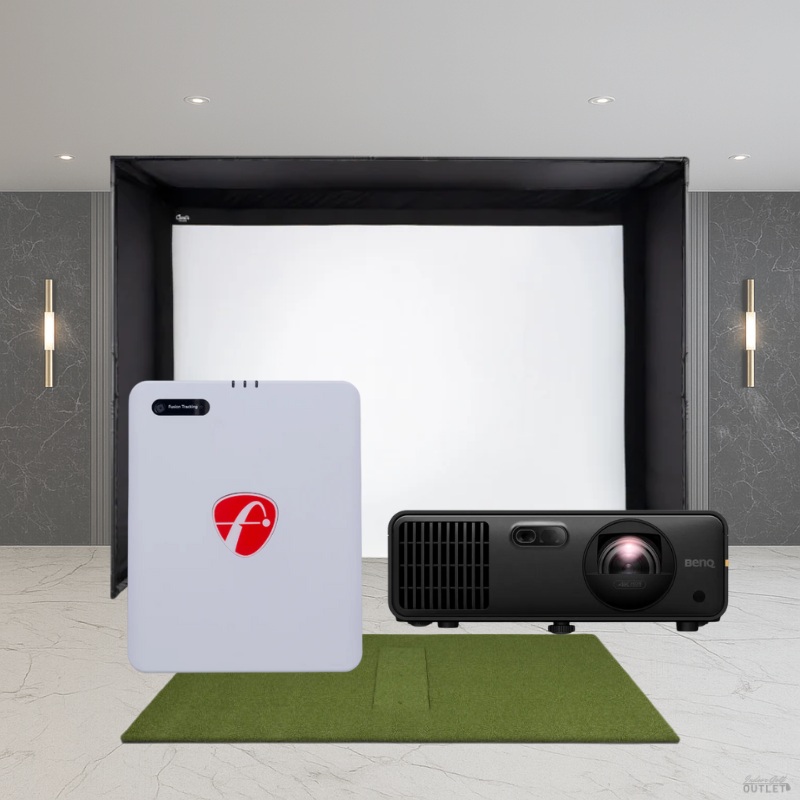
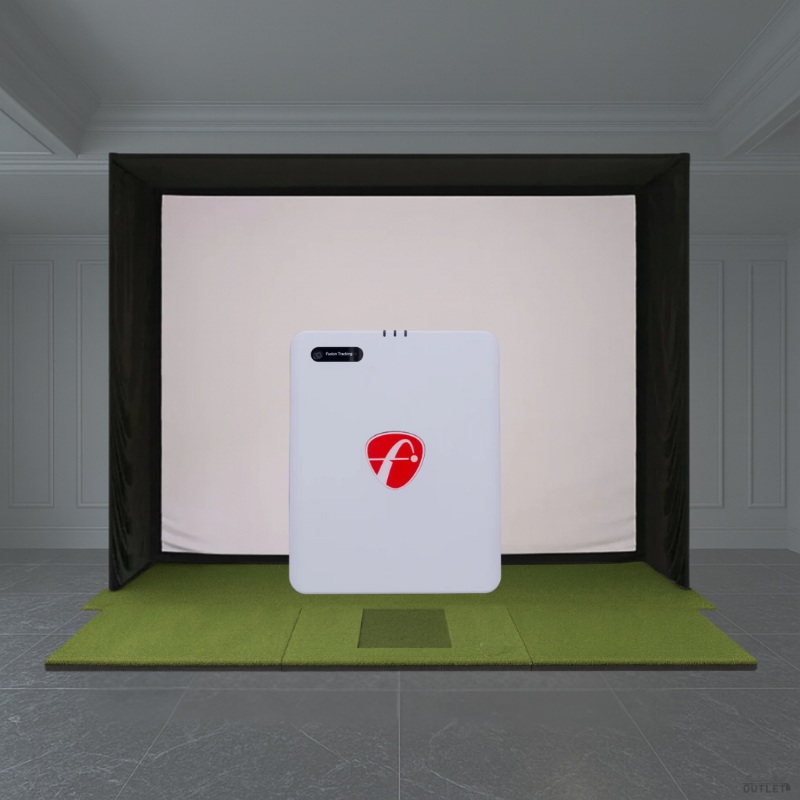
The FlightScope Mevo Gen2 DIY Golf Simulator Package is the ultimate solution for customizability and affordability in a golf simulator package. The package includes the FlightScope Mevo Gen2 Launch Monitor, Carl's Place DIY Golf Simulator Enclosure Kit with Premium Impact Screen in your preferred size, and choice of hitting mat and projector. The Mevo Gen2 is powered by 3D Doppler radar and offers 20 ball and club data parameters for a deeper understanding of your game. Compact and highly portable, it works both indoors and outdoors, integrates with FlightScope apps for video analysis and performance tracking, and supports simulation software for a complete training and entertainment solution.What's Included: FlightScope Mevo Gen2 Launch Monitor Carl's Place DIY Golf Simulator Enclosure Kit with Premium Impact Screen Choice of Carl's Place HotShot Golf Hitting Mat Choice of BenQ Projector Optional Accessories (Not Included): Pipe Framing Kit for DIY Golf Simulator Enclosure (Recommended) Foam Insert Kit (Recommended) Safety Baffle (Recommended) Back Cover Kit for DIY Golf Simulator Enclosure Back Cover Pipe Kit for DIY Golf Simulator Enclosure Net Wall Extensions for Golf Simulator Enclosure Putting Turf Projector Mount Gaming PC or Laptop Features Patented Fusion Tracking Technology Combines 3D Doppler Radar with synchronized image processing for superior accuracy and consistency.FlightScope Shot Tracer Records and displays 3D swing trajectories with data overlays, delivering a professional TV broadcast experience for every shot. Action Video Clips With Data Overlay Automatically records and saves swing videos, overlaying shot data and allowing users to annotate and add voice comments. Lightweight And Portable Easy to transport and set up for both indoor and outdoor use with a robust 6-hour battery life and USB-C charging. Free Software No subscriptions or hidden feesenjoy FS Golf software and skills app on multiple devices at no additional cost.Lifetime E6 Connect Simulation Bundle Play on (8) world-renowned golf courses on iOS and PC with exclusive simulation access.3rd Party Integrations Seamlessly connects with top golf software and training systems, enhancing the overall user experience. What's Included FlightScope Mevo Gen2 Launch MonitorEnjoy a lightweight and portable device with up to 6 hours of battery life, USB-C fast charging, and seamless setup for both indoor and outdoor use. With no required subscriptions, hidden fees, or annual license costs, users benefit from free FS Golf software for iOS, Android, and PC, as well as a skills app for iOS and Android.Professional-grade features include the acclaimed FlightScope Shot Tracer, action video clips with data overlays, and the ability to share 3D swing trajectories effortlessly. The Mevo Gen2 also comes with a lifetime E6 Connect Simulation Bundle, featuring 8 world-renowned golf courses for immersive practice and play. Carl's Place C-Series DIY Golf Simulator Enclosure Kit with Premium Impact ScreenOffering a seamless, turf-to-screen experience with a borderless bottom, the Carl's Place C-Series DIY Golf Simulator Enclosure Kit with Premium Impact Screen enables you to be fully immersed in your practice sessions. Choose from 6 sizes for maximum customization and to turn virtually any space into a golf simulator studio.The Black Nylon Enclosure, Steel Corner Fittings, and Ball Bungees with Zip Ties are included with your DIY Enclosure Kit. Add the Carl's Place Pipe Framing Kit, Foam Insert Kit, Safety Baffle, Back Cover Kit, Back Cover Pipe Kit, and Net Wall Extensions to allow for a streamlined assembly process and for an added layer of customization.Carl's Place HotShot Golf Hitting MatChoose from the Carl's Place 5'x8' or 4'x9' HotShot Golf Hitting Mat to complete your practice package. Both the 5'x8' and 4'x9' are designed to accommodate right and left-handed players and feature a hitting strip that allows for swift replacement after you have worn out this section on your mat. Engineered to be joint-friendly and anti-fatigue, the HotShot Hitting Mats enable you to enjoy hours of play without discomfort.Choice of BenQ ProjectorChoose from the BenQ AH700ST (laser-based) or AK700ST (laser-based 4K) Projector depending on your budget. The AH700ST offers 4,000 lumens with automatic adjustment capabilities that quickly align the image to your impact screen, making it perfect for fast and hassle-free golf simulation setups.Upgrade to the AK700ST to experience 4K graphics and all of the same benefits as the AH700ST including automatic adjustment capability. Both the AH700ST and AK700ST feature a 0.69-0.83 throw ratio that allows the projector to be mounted slightly behind the tee area which is optimal for most standard golf simulator setups. What's Measured The FlightScope Mevo Gen2 Launch Monitor provides (18) full swing, chipping, and putting data parameters for a complete picture of your golf performance. These include carry distance, total distance, ball speed, club speed, spin rate, launch angle, and more - delivering the insights you need to improve every aspect of your game. Specifications FlightScope Mevo Gen2: Dimensions: 6.9"H x 1.2"D x 5.6"W Weight: 17.6 ounces Batteries: Rechargeable Li-ion battery (included) Carl's Place C-Series DIY Enclosure Specifications: Depths: Available in 5' standard depth. The enclosure frame's footprint extends ~1 ft behind the screen. EMT Requirements: Unless you have purchased the Pipe Framing Kit accessory, you will need to purchase 1-inch EMT (electrical metal tubing) from your local hardware store to complete your frame. Please note, 1-inch EMT is the US trade name of the material, however the true outer diameter is 1.163" or 27mm. Carl's Place HotShot Golf Hitting Mat: 5' x 8' HotShot Dimensions: 5'D x 8'L x 1.75"H 4' x 9' HotShot Dimensions: 4'D x 9'L x 1.75"H Hitting Insert Dimensions: 12"W x 30"L x 1.75"H Hitting Insert Real Tee Compatibility: Yes Pre-Cut Holes for Tee Receivers: Yes Requirements FS Golf App Requirements:iOSMinimum: System: iOS 17 or newer iPad: 8th Gen / Mini 6th Gen / Air 5th Gen / Pro 4th Gen or newer iPhone: XR / XS / 11 or newer Recommended: System: iOS 18 iPad: iPad Pro 6th or 7th Gen iPhone: 15 Pro / 16 Pro or newer AndroidMinimum: System: Android 10 or newer Processor: Snapdragon 865 / Exynos 990 or equivalent RAM: 8 GB Recommended: System: Android 11 or newer Processor: Snapdragon 8 Gen 1 / Exynos 2200 or equivalent RAM: 12 GB or more WindowsMinimum: OS: Windows 10 or 11 (64-bit) CPU: Intel Core i3-13100 / Ryzen 5 5560 or higher RAM: 8 GB DDR4 or higher Storage: 128 GB (at least 10 GB free space) Recommended: OS: Windows 10 or 11 (64-bit) CPU: Intel Core i5-10210 / Ryzen 5 5600 or higher RAM: 16 GB DDR4 or higher GPU: Intel UHD Graphics / Radeon Graphics or better (compatible with DirectX 11) Storage: 256 GB (at least 10 GB free space; SSD recommended) Indoor Setup Requirements: Tee to Impact Screen Minimum Required Distance: 8' Unit to Tee Required Distance: 8'*Aluminum stickers or Titleist RCT balls are required for indoor use Outdoor Setup Requirements: Unit to Tee Required Distance: 8' with unrestricted ball flight Additional Setup Restrictions:Mevo Gen2 is designed to operate in most environments. However, certain appliances and equipment can create restrictions that can interfere with the performance and accuracy of the Mevo Gen2 data. Some common objects are: Airconditioners Fluorescent lights Fans Fridges TV's, laptops, desktop computers in front of the Mevo Gen2 Signal towers FAQ Q: What is included with the FlightScope Mevo Gen2 DIY Golf Simulator Package?A: FlightScope Mevo Gen2 Launch Monitor, Carl's Place DIY Golf Simulator Enclosure Kit with Premium Impact Screen, choice of Carl's Place HotShot Golf Hitting Mat, choice of BenQ Projector.Q: How far away should I stand from my impact screen?A: For the safety of both the golfer and the screen, we recommend standing a minimum of 10-12 feet away from the screen.Q: How much buffer space do I need around my enclosure?A: For Carl's Place DIY Enclosure Kits, we recommend you give yourself an absolute minimum of 2-3 inches buffer space from the height you have available. For width, subtract 4-6 inches from your available space to allow 2-3 inches of clearance on each side. Keep in mind that C-Series enclosures include a rear backset fitting that adds 8.25 inches to the depth, creating a built-in buffer for safety. Q: How much space do I need for the enclosure?A: When planning your simulator space, consider several factors including buffer space around walls and ceilings, enclosure footprint, launch monitor requirements, safe golfer distance (10-12 feet from the screen), golfer height, club length, turf thickness, and any nearby furniture or doorways.Q: What if the black enclosure material gets hit with a golf ball?A: The black enclosure material isnt designed to take direct hits, but if a ball bounces off the impact screen and hits the enclosure, you should not experience any issues.Q: What pipes do I need to construct the enclosure kit frame?A: DIY Enclosures require 1-inch EMT (Electrical Metal Tubing). You can either add a pre-cut Pipe Framing Kit for DIY Golf Simulator Enclosure to your order or source EMT locally.Q: How long does it take to assemble the enclosure?A: Assembly time for DIY Golf Simulator Enclosure Kits is about an hour, depending on size and whether you have a helper. For guidance, refer to our assembly video and manual.Q: Where and how should I mount my projector?A: Projector placement depends on your viewable screen dimensions and the throw ratio of your projector. Feel free to reach out to our team so we can provide you with the exact mounting location based upon the enclosure size and projector that you choose. Common mounting options include flush or drop mounts. Resources Documents: Carl's Place C-Series DIY Golf Simulator Enclosure Kit Assembly Instructions & User Manual