




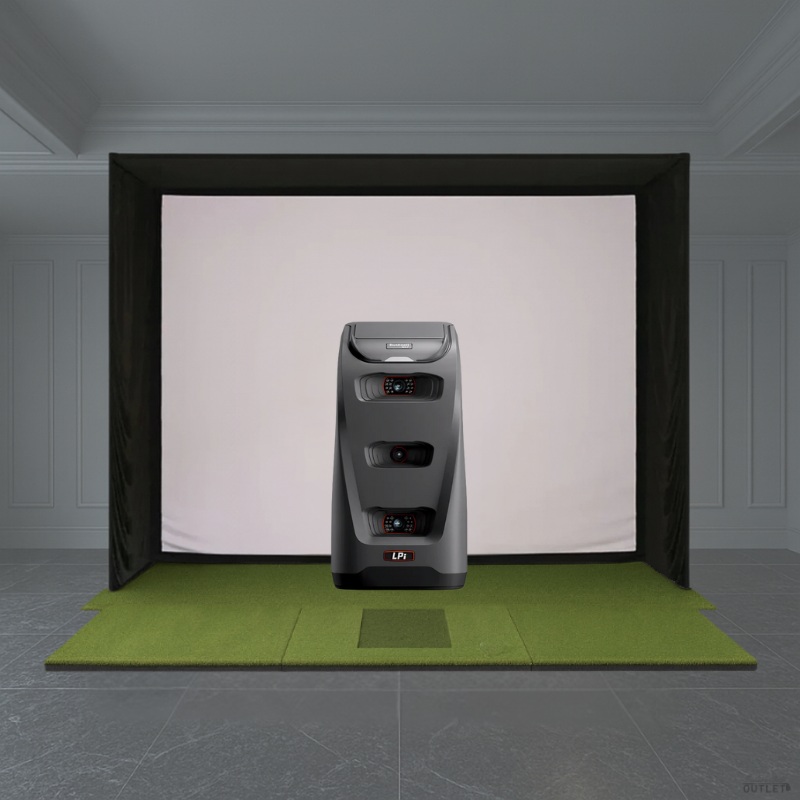
The Bushnell Launch Pro Indoor (LPi) SIG Golf Simulator Package includes the Bushnell LPi Launch Monitor, SIG Golf Simulator Enclosure in your preferred size and screen material, SIG Landing Pad Turf, and choice of SIGPRO Golf Mat. Experience Tour-validated accuracy and industry-leading performance insights with the Bushnell LPi Circle B Edition Launch Monitor, designed specifically for indoor simulation. Whether you're looking to improve your game or enjoy hyper-realistic virtual golf, the LPi delivers unmatched precision and reliability.The SIG Golf Simulator Enclosure includes all of the necessary components to complete your assembly including a SIGPRO Premium (White) or Premier (Gray) Golf Simulator Impact Screen, push pin poles and connectors, protective foam padding, premium enclosure surround material, and ball bungees. What's Included: Bushnell LPi Circle B Edition Launch Monitor Choice of SIG8, SIG10, or SIG12 Enclosure Choice of SIGPRO Premium (White) or Premier (Gray) Impact Screen SIG Landing Pad Turf Choice of SIGPRO Golf Mat Push Pin Poles and Connectors Protective Foam Padding Premium Enclosure Surround Material Ball Bungees*SIG Landing Pad Turf is not included if SIGPRO Golf Simulator Flooring is chosen for your hitting mat selection Optional Accessories (Not Included): Projector Projector Mount Golf Simulator Computer or Laptop Side Barrier Netting Baffle Blackout Screen Features Camera-Based MeasurementThe Launch Pro Indoor's tri-camera optical system captures every detail of ball and club interaction with exceptional clarity, relying on pure measurement rather than estimations. This ensures studio-level accuracy that high-performance golfers can trust on every swing. Indoor SimulationPurposefully designed for indoor use, the Launch Pro Indoor integrates seamlessly with FSX Silver and Gold software to deliver refined shot physics, premium course visuals, and a comprehensive suite of performance tools. It brings an elevated, year-round training ecosystem to your indoor setup. Gameplay As Real As It GetsThrough FSX Play and FSX Pro, golfers access sophisticated analytics, online gameplay, data-rich shot tracking, expansive course options, and advanced visualization tools. Each subscription tier unlocks deeper layers of immersion and performance insight. Unlock Your GameThe Launch Pro Indoor supports a tiered software model that allows players to scale their simulation experience as they grow. The Gold tier expands the system into a fully immersive performance suite with GSPro access, advanced analysis, and a premium library of world-class courses. What's Included Included with Your Purchase: Bushnell LPi Circle B Edition Launch Monitor Choice of SIG8, SIG10, or SIG12 Enclosure Choice of SIGPRO Premium (White) or Premier (Gray) Impact Screen SIG Landing Pad Turf Choice of SIGPRO Golf Mat Push Pin Poles and Connectors Protective Foam Padding Premium Enclosure Surround Material Ball Bungees*SIG Landing Pad Turf is not included if SIGPRO Golf Simulator Flooring is chosen for your hitting mat selection Optional Accessories (Not Included): Projector Projector Mount Golf Simulator Computer or Laptop Side Barrier Netting Baffle Blackout Screen Specifications SIG Enclosure SpecificationsSIG8: Overall Enclosure Dimensions: 8'4"W x 8'4"H x 5'D Viewable Screen Dimensions: 7'7"W x 7'7"H x 10'8"Diag. Aspect Ratio: 1:1 SIG10: Overall Enclosure Dimensions: 10'10"W x 8'4"H x 5'D Viewable Screen Dimensions: 10'1"W x 7'7"H x 12'7"Diag. Aspect Ratio: 4:3 SIG12: Overall Enclosure Dimensions: 12'2"W x 9'4"H x 5'D Viewable Screen Dimensions: 11'5"W x 8'7"H x 14'3"Diag. Aspect Ratio: 4:3 Please Note: We recommend you give yourself an absolute minimum of 2-3 inches of buffer space between the top of your enclosure and ceiling to be able to complete your enclosure assembly with ease. For width, we recommend giving yourself 2-3 inches of buffer space between each side of your enclosure and side walls.Hitting Mat SpecificationsFairway Series: Dimensions: 5'D x 5'W x 1-"H Weight: 41 lbs Real Tee Compatibility: Yes SIGPRO Softy 4' x 7': Dimensions: 4'D x 7'W x 2-"H Weight: 21 lbs Replaceable Hitting Strip: SIGPRO Softy (Included) Hitting Strip Dimensions: 28"L x 12"W x 2-"H Real Tee Compatibility: Yes SIGPRO Softy 4' x 10': Dimensions: 4'D x 10'W x 2-"H Weight: 31 lbs Replaceable Hitting Strip: SIGPRO Softy (Included) Hitting Strip Dimensions: 28"L x 12"W x 2-"H Real Tee Compatibility: Yes SIG8 Golf Simulator Flooring: Dimensions: 15'6"D x 9'8"W x 2-"H Replaceable Hitting Strip: SIGPRO Softy (Included) Hitting Strip Dimensions: 28"L x 12"W x 2-"H Center of Hitting Strip to Impact Screen: 10'6" Real Tee Compatibility: Yes Stimpmeter Reading: 9-10 Putting Cups: (4). Flags not included. SIG10 Golf Simulator Flooring: Dimensions: 15'6"D x 11'7"W x 2-"H Replaceable Hitting Strip: SIGPRO Softy (Included) Hitting Strip Dimensions: 28"L x 12"W x 2-"H Center of Hitting Strip to Impact Screen: 10'6" Real Tee Compatibility: Yes Stimpmeter Reading: 9-10 Putting Cups: (4). Flags not included. SIG12 Golf Simulator Flooring: Dimensions: 15'6"D x 13'6"W x 2-"H Replaceable Hitting Strip: SIGPRO Softy (Included) Hitting Strip Dimensions: 28"L x 12"W x 2-"H Center of Hitting Strip to Impact Screen: 10'6" Real Tee Compatibility: Yes Stimpmeter Reading: 9-10 Putting Cups: (4). Flags not included. Landing Pad Turf SpecificationsSIG8 Landing Pad Turf: Dimensions: 8'D x 8'2"W x "H Weight: 38 lbs Construction: 2 halves rolled together Material: Nylon SIG10 Landing Pad Turf: Dimensions: 8'D x 10'6"W x "H Weight: 39 lbs Construction: 2 halves rolled together Material: Nylon SIG12 Landing Pad Turf: Dimensions: 9'D x 12'W x "H Weight: 40 lbs Construction: 2 halves rolled together Material: Nylon FAQ Q: What is included with the Bushnell Launch Pro Indoor SIG Golf Simulator Package?A: Bushnell LPi Circle B Edition Launch Monitor, choice of SIG8, SIG10, or SIG12 Enclosure, choice of SIGPRO Premium (White) or Premier (Gray) Impact Screen, SIG Landing Pad Turf, choice of SIGPRO Golf Mat, push pin poles and connectors, protective foam padding, premium enclosure surround material, ball bungees.*SIG Landing Pad Turf is not included if SIGPRO Golf Simulator Flooring is chosen for your hitting mat selection.Q: How far away should I stand from my impact screen?A: For the safety of both the golfer and the screen, we recommend standing a minimum of 10-12 feet away from the screen.Q: How much buffer space do I need around my enclosure?A: We recommend you give yourself an absolute minimum of 2-3 inches of buffer space between the top of your enclosure and ceiling to be able to complete your enclosure assembly with ease. For width, we recommend giving yourself 2-3 inches of buffer space between each side of your enclosure and side walls.Q: How much space do I need for the enclosure?A: When planning your simulator space, consider several factors including buffer space around walls and ceilings, enclosure footprint, launch monitor requirements, safe golfer distance (10-12 feet from the screen), golfer height, club length, turf thickness, and any nearby furniture or doorways.Q: What if the black enclosure surround material gets hit with a golf ball?A: The black enclosure surround material isnt designed to take direct hits, but if a ball bounces off the impact screen and hits the enclosure, you should not experience any issues.Q: Is all of the necessary piping included to complete the assembly of my enclosure?A: Yes, your purchase includes push pin poles that are sized to the exact dimensions required for your chosen enclosure size. Connectors are also included.Q: How long does it take to assemble the enclosure?A: Assembly time for your SIG Enclosure is about 1-2 hours, depending on size and whether you have a helper. For guidance, refer to our assembly video and manual.Q: Where and how should I mount my projector?A: Projector placement depends on your viewable screen dimensions, aspect ratio, and the throw ratio of your projector. Feel free to reach out to our team so we can provide you with the exact mounting location based upon the enclosure size and projector that you choose. Common mounting options include flush or drop mounts. Resources Documents: SIG8 Enclosure Assembly Instructions SIG8 Flooring Assembly Manual SIG10 Enclosure Assembly Instructions SIG10 Flooring Assembly Manual SIG12 Enclosure Assembly Instructions SIG12 Flooring Assembly Manual SIG8 Assembly Videos: SIG10 Assembly Videos: SIG12 Assembly Videos: